Jom - Grocery App
For Jom - Grocery App


HYFATech
Tech partner for your ideas and growing businesses
- Industry
Retail  Time & Budget
$25,000 to $50,000
About Jom - Grocery App
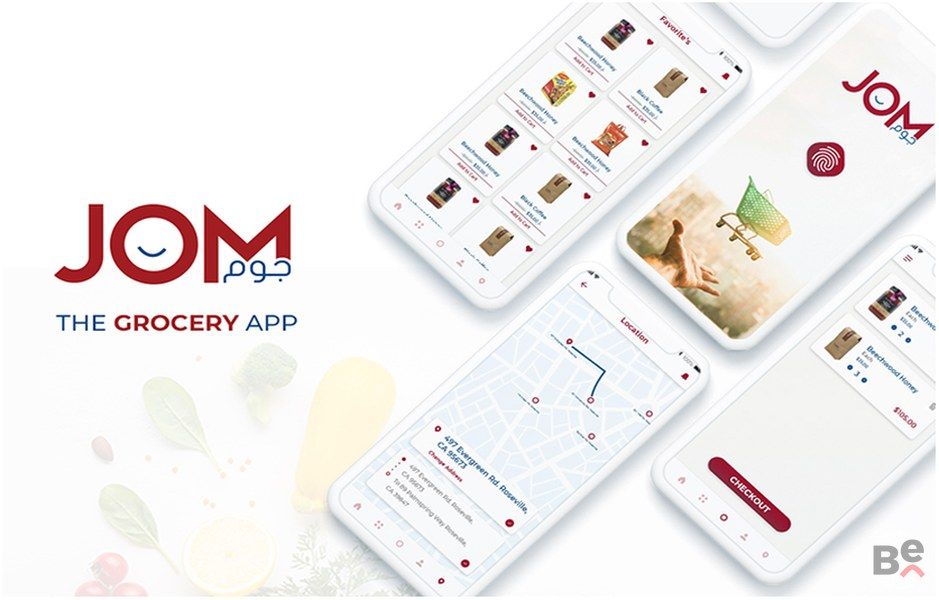
Jom Mart is an e-Commerce Grocery App that provides the best user experience to make shopping much more rewarding. Users can create their profile to place an order and then track their order from the Order Tracking section. The App also allows the user to reorder a list of their items with a quick ‘Reorder’ button.
How it Works:
- Users can download the App from both Play store and App store
- Users can create an account by adding a unique number and then verifying their account via OTP
- The App also provides a guest user experience for all those customers who want to explore the App before signing up for it
- Jom Mart provides bilingual support. Upon signup users are asked to choose their preferred language; Arabic or English
- Once on Home Screen, user will see a list of products they can choose to add to their cart
- Users can search for a product or they can explore products within categories
- User can add multiple products to cart and then manage their cart accordingly
- Before confirming the cart, user can get a discount on the products if they have a coupon to redeem
- The App asks user to confirm their address or the user can add a new address. A new address can be added manually or it can be fetched through user’s location
- Before submitting the order, user is shown their order summary to confirm all details
- User can also track their order from the Order Tracking session. Once the order is delivered, user can rate the order
- The app also allows user to mark products as favorite which they can then view from ‘Favorite’ section
- There is also a functionality for Barcode scanning where user can scan a barcode for an item to check its availability
- Admin can manage customers and edit their details
- Admin also accepts order and changes the status for each order once it gets delivered
- The details of all products along with the inventory are also managed from the admin panel